
WCC Student ID Cards
Fall 2026 – Digital Student ID will be reissued after census 9/8/2026
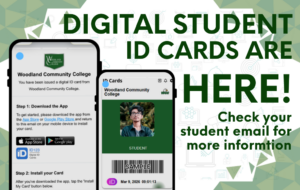
Woodland Community College is now providing digital student ID’s.
In order to receive a student ID card, you must:
- Be enrolled in at least one class (not waitlisted)
- You will or should have received an email from Digital ID Card App (invite@id123.io)
- Subject: Woodland Community College: Activate your digital ID card
- Once the email is received please follow the directions.
- Download the App in the App Store or Google Play Store,
- Install your card (by either tapping on “Install my card” or From your desktop scan the QR code from your email
- Confirm your identity by logging into your portal/email (Single Sign-on)
- Upload your photo (either from your photos or by taking one)
- Once your photo is uploaded, it will then need to be approved by our team. Please allow 2-5 business days for approval. Once approved, it will show on your digital ID
- Photo Guidelines:
-
- Photo should be with a neutral or smiling face; avoid extreme expressions and gestures.
- Background must be clear of obstruction
- Facing forward, looking directly at the camera; no downward, upward, or sideways tilt. (above the shoulder – similar to a passport photo)
- No hats, sunglasses, scarfs or accessories obstructing your face
- Image must be properly lite to allow their features to be identified without shadowing their face.
- Standard color photo; no black & white, opaque or other modifications or filters.
- Your photo may not display any obscene/profane/lewd language, gestures, or imagery.
-
For more information please go to here for more information go to https://www.id123.io/knowledgebase/how-to-authenticate-your-digital-id-card-via-sso/